Showing posts with label Tutorials. Show all posts

Shortcut file properties in windows

basic tutorials, windows, tutorials, shortcut file

Want to create a shortcut file in Microsoft Windows so that it open a specific file in a specific software? Also you can open a file with the shortcut key. Yes you can create a Windows shortcut file to open a file in a software. For example if you want to open a image file in png, gif, jpeg format in Adobe Photoshop or Inkscape, or you want to open a website in Google Chrome and another in Mozilla Firefox or Internet Explorer you can do that by creating different Microsoft Windows shortcut files. You just have to configure it.

How to create video tutorials?

screencast-o-matic can be used to create video tutorials
Everyone want to make their technology website or blog more professional with video tutorials. But when it comes to 'How?' you will search a software that may help you. If you don't come to a software that can you help you then this post will help you with the software.
Screencast-O-Matic is the best free software I found on the web for recording your computer screen, audio from microphone, notes and from webcam. Best thing is that the software can create high quality videos and both free and paid versions are available. There is no watermark or advertisement in videos created by Screencast-O-Matic even in the free version.

Limitations of free version: You can keep only one video to be edited in the software. Don't get confuse with the production of software because software can produce unlimited videos for free but you can only keep a single video to be edited, for example, you can add notes etc. There are no more limitations in the free version. You can click 'Done with the video' to create more videos.

Features:
High quality videos.
Options of video size: HD, fullscreen and many.
We can show or hide mouse clicks, mouse cursor.
We can add notes.
We can pause recording.
The software is very easy to use and you will master it in very soon.
You can upgrade to paid version with lot of more features.

Tips:
You can create a channel on YouTube and upload your video tutorials to that.
Give link to your related post in the video and in the description on YouTube. This will help you increase visitors on your website.
Don't forget to embed the video in the related post.

Find where are Folder Options in Windows 7


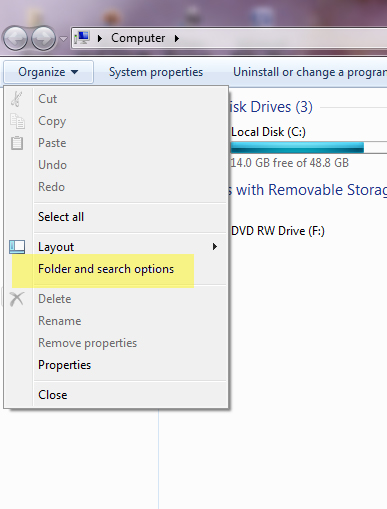
Where are the 'Folder Options' in Microsoft Windows 7?
In Microsoft Windows XP, The folder options were simple to find. But in Microsoft Windows 7, Microsoft has made some changes. If you want to find the folder options in Microsoft Windows 7. And the truth is that Folder Options are more easy in Microsoft Windows 7 to find.

You can do this by just typing 'Folder Options' in Start
Check the screenshot.

Or if doesn't work, You can find the Folder options by following the following steps:

  1. Go to My Computer (or press Windows + E)
  2. Click on 'Organize'
  3. Then click on 'Folder Options'
  4. Here you can chose the options you want.
  5. Done.Check e screenshot
Other Method is by Going to Control Panel.

How to switch windows in Microsoft Windows 7

This post is about changing or switching the windows
Ways to switch windows in Microsoft Windows:
1. By using mouse
2. By pressing Windows+Tab


3. By pressing Alt+Tab


How to launch Task Manager in Windows 7?

The Best ways to launch Windows Task Manager in Microsoft Windows 7:

How to launch Windows 7 Task Manager directly?
Uses of Task Manager:
To see the processes which are running on the system.
To end the process which is not responding.
To see the CPU and RAM usage
To check the status of Networking
To check the the status of users.

Best Method To launch Task Manager: Just Press Ctrl+Shift+Esc Simultaneously.
Other Methods:
Right Click on Windows Task Manager, and click on 'Start Task Manager'
Press Ctrl+Alt+Delete, Then Select Start Task Manager
Press Windows+R or run Windows Run, then type 'taskmgr' without semicolons and press 'Enter'

In Microsoft Windows XP you pressed/press CTRL+ALT+Delete to launch Task Manger but in Microsoft Windows 7, when you presses the same something different happens. A Windows 7 screen with many options like 'Lock this computer', 'Switch user', 'Change a password' is launched. Then you click on  'Launch Task Manager'. Sometime you do it with right-clicking on the Windows Task Bar and clicking on 'Task Manager'. But when your computer freezes/hanged then it these ways hardly works. The screen what you see on pressing Ctrl+Alt+Delete is:


Best way to press these three buttons simultaneously is:
to put your left hand's thumb on Shift and Ctrl and the left hand's index finger on Esc
In the following manner:


Comments are most welcomed

Make your blog look like a website


First of all download a good looking blogger template from BTemplates
Then upload that to your blog. To upload go to your blog Template>Backup/Restore>Upload and upload the xml template

Create 4 to 5 pages for example Home, About, Contact, Privacy Policy, Support etc.
Go to settings and redirect your blog to your homepage
On Every page go to edit HTML and paste this HTML Code there


<style>
.post h3 {display:none !important;}
</style>


The above code should be pasted in all pages but not in posts.

Go to advanced>Add CSS and add the following lines:
To remove navbar add this code:

#navbar-iframe {display: none !important;}body .navbar {
height:0px;
}
.content-outer {
margin-top:0px;
}

To remove attribution add this code:

#Attribution1 {display: none;}

To remove <<Newer Link   Home  Older Link>> add this code

#blog-pager-newer-link {display: none;}
#blog-pager-older-link {display: none;}
#blog-pager {display: none;}

Create a static home page if you want your website don't look like a blog
Then redirect your home page to the static home page.
I recommend you to add a picture slider on the static home page.

This will remove all the bloggers navbar and other hints

design your blog as a website

How to view source of a page in Google Chrome if right click is disabled?


Sometimes few website disables the right click on their webpages for many purposes e.g. to stop download of a image from their page, disable copy of any content blah blah blah...

So straightly to do this just type

view-source:

before the URL of the webpage of which you want to see the page source.

I hope it will work..!

How to make windows taskbar auto-hide?


To do this just follow the following steps:
1. Right-click on the windows taskbar
2. Click on properties
3. Check "Auto hide taskbar"
4. "Apply" the settings

How to change the position of windows taskbar/start menu bar?


To change the position of windows task bar e.g. if you want to change the position of your taskbar from bottom to the top of your monitor screen just follow the following steps:
1. Right-click on the windows task bar
2. If there is tick-mark before the option "Lock the taskbar", then click on this option, if tick-mark is not there don't do so.
3. Drag the taskbar to the top of your screen or anywhere you like it.
4. This will also help the people who changed the position of their taskbar and want to set it default.

How to translate a website to English which is in different language?


To translate a website, follow following steps:
1. Copy the following URL:

http://translate.google.com/translate?sl=auto&tl=en&js=n&prev=_t&hl=en&ie=UTF-8&layout=2&eotf=1&u=http%3A%2F%2F

2. Paste this URL to the address bar of your internet browser:
3. Now type your desired website domain after this URL. e.g. if you want to translate mywebsite.com
then the URL should look like this:

http://translate.google.com/translate?sl=auto&tl=en&js=n&prev=_t&hl=en&ie=UTF-8&layout=2&eotf=1&u=http%3A%2F%2Fwww.mywebsite.com


change www.mywebsite.com to the website name of the website which you want to translate...

How to make bootable disc/CD/DVD of a OS (Operating System)


Prerequisite Softwares:
Nero OEM/Multimedia Suite

To make bootable disc/CD/DVD of a operating system like linux/windows/mac, follow the following steps:
1. Insert a bootable CD/DVD in your Disc Writer/DVD Writer/CD Writer
2. Run 'Nero'
3. Click on 'Copy Disc/CD/DVD
4. Select "Image Recorder" in the first option and the Disc partition in the second option.
5. Now click on 'Copy'
6. Select a desired folder where you want to save the image file, it will start creating an image file in your hard disc
7. On completion, eject out the disc and insert a blank writable disc/CD/DVD
8. Now open the image file in Nero, I hope you will not need do this as it is automatically set for image file
9. Now burn this image file to blank disc by clicking on copy/burn to disc option.
Thank for reading!!

How to redirect blogspot/blogger post home page to other page on the blog?


To redirect the blogspot/blogger post home page to your wanted other page on the same blog it is very simple, just follow the following steps:
1. Just login to your blogger account
2. Go to your blog
3. Go to "Settings"
4. Go to "Search Preferences"
5. Edit "Custom Redirects"
6. In the first textbox type "/"
7. In the second textbox type the page URL of your desired page where you want to redirect (e.g. if the URL of that page is myblog.blogspot.com/p/about, then you just have to type "p/about" in the textbox.
Now check you will be redirected to your desired webpage without visiting the post page.

This method is used when you have a static blogger page and you want to redirect from your default new posts home page to the static webpage

How to download a song where Yahoo! Webplayer plays song?


DISCLAIMER: Please do not try to download copyright material from the websites

Hey!! Now I will tell you how to download a music file or song from a website where Yahoo Webplayer plays the music files.
Its very simple.. Just right-click on the song title/song link and then select "Save target as" or "Save link as" option, it depends on the internet browser you use.
Now save the file and the download will start... enjoy!!

How to refresh a page of my website using HTML?


You will need this feature due to the following reasongs:
1. Your website is upadated every second
2. Your website page provide live sport score
3. For your personal reason

To make your page refresh automatically in 15 seconds (You can change it by changing content's value) , just copy and paste this HTML code in your webpage's HTML:

<META HTTP-EQUIV="REFRESH" CONTENT="15">

How to log out or sign out all the accounts from my browser?


It is very simple to log out or sign out all the accounts in your particular browser. Do the following steps:
1. Open the browser from which you want to log out or sign out all the accounts like Facebook, Gmail, Yahoo Mail and all other accounts.
2. Go to browser's history
For Google Chrome's browsing history click here
3. Delete the browser cache
4. It should log out all the active or signed in accounts

How to change blogger favicon?


To change blogger or blogspot favicon, follow the following steps:
1. Log in your blogger account
2. Go to "Layout"
3. Click on the "Favicon" option
4. Upload the wanted or desired image to set the favicon of your blog.

Note: You should have a square image that means that your image should have equal height and width.

If your browser don't show your new favicon then follow the following steps:
1. Close all the tabs of your browser or restart it.
2. Go to History.
3. Delete cache and browsing history there.
4. Open your blog URL e.g. yourblog.blogspot.com
Now, the browser should show the new favicon.

How to hide blogger attribution?


To hide your blogger or blogspot attribution which is seen in the bottom or your page, just follow the following steps:
1. Log in to your blogger
2. Go to "Template"
3. Go to "Customise"
4. Select "Advanced"
5. Select "Add CSS" in Advanced options.
6. Paste the following code there:

#Attribution1 {display: none;}

It will hide the attribution from your blog.

How to hide blogger navbar?


To hide the navbar in your blog using blogspot or blogger is a very simple process. You just have to follow the following steps:
1. Log in to your blogger account
2. Go to the Template
3. Go to Customise
4. Select Advanced option
5. Select Add CSS
6. Paste the following code:


#navbar-iframe {
display:none !important;
}

For sure it will hide your navigation bar or blogger navbar

How to remove all hyperlinks in word?


How to remove all hyperlinks in Microsoft Word 2007?

Its Dev, I tried googling on this question and the solution that came out is that we can do this by these two simple steps:

STEP 1: Press Ctrl + A, It will select all the texts and images in your document
STEP 2: Press Ctrl +Shift + F9

This will remove all hyperlinks from your Word File


HOME      CONTACT      ABOUT      SUBMIT


Blog by Dev Baisoya | Proudly powered and hosted by Blogger