Showing posts with label Illustration. Show all posts

Facebook Timeline Cover for Facebook Pages

I have posted this post for you to design the Best Facebook Cover for your Facebook Page. For layout of Facebook Cover for Facebook Profiles click here for my post on  'Facebook Timeline Cover for Facebook profiles' on TechiMen.
The profile picture and cover of your Facebook Page influence the visitor of your page. If your page looks good and professional that will force people to like your page. And if your page look ugly or unattractive then she or he will leave the page immediately. Here I at TechiMen designed the layout for Facebook Timeline Cover for your Facebook Page.

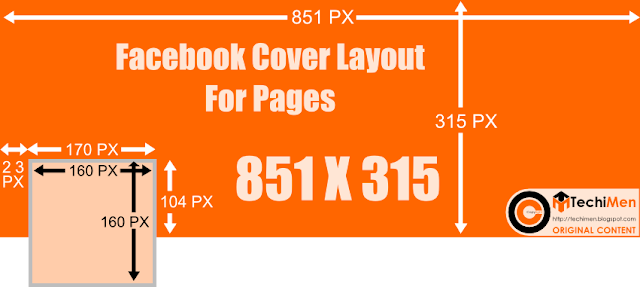
You can also observe the following layout of FB Cover for pages with the page profile picture layout. Just use this and design both of your page profile picture and the cover by using your creativity.

Here are some examples of Facebook pages using creative Facebook cover and profile picture. These pictures will inspire your Facebook Timeline Cover.

Gucci Facebook Page: Logo background meets the Facebook Cover

KLM Facebook Page: Having the logo in profile picture with its logo and a flying airplane in the Cover. Good creativity. Isn't it?

Nike Facebook Page: The photographer is full of ideas.

Woodooz Facebook Page: For all things you can do. Yourself. Their slogan matches their creativity.

You can also have look on more this type of Facebook Covers. Just search 'Creative Facebook Cover' in GOogle Images Search.

Design Twitter Header or Cover Layout

Want to design your Twitter Header creatively?
How to make Twitter Header?
TechiMen will help you.
Visit our Twitter Page for example.
The design of your page or profile on Google, Facebook, YouTube or on any site influence people's brain and they can know what you are.
The Twitter Header is also something that attracts people on Twitter. Therefore we at TechiMen designed a layout for Twitter Header. Many people also call Twitter Header as Twitter Cover.
Following is the layout designed by us for Twitter Header or Cover that will help you to create stunning Twitter Header.


Tips:

  1. The size of Twitter Header of Cover should be 520X260.
  2. Do not place any logo or text where will be your name, username, description, location or website.
  3. You can use any Vector Editor (Corel Draw, Adobe Illustrator). Inkscape is free available open-source Vector Editor.
  4. You can request for the Inkscape SVG file or Photoshop File which is editable from us by mailing us to dsbaisoya@gmail.com.
  5. You can create Twitter Header online here.
  6. You can also create the file in 1200X600 size as Twitter recommends for good quality.

Our Twitter Header For TechiMen

Our Twitter Page after uploading above Twitter Header.

Websites from where you can download ready-made free Twitter Header or Cover for your Twitter profile.
TwitCover: The website has creative Twitter Headers or Twitter Covers. They also have online app by which you can design your own Twitter Header online.
TwitrCovers: The website shows the preview when you hover your mouse pointer on a cover. You can chose your cover by choosing categories.
TwitterHeaders: You can directly upload the Twitter Header to your profile from here. Online Header creation option is also available.

Some other examples are here:
 If you want to create these type of Twitter Headers you should have a little knowledge of Adobe Photoshop. Just place your body in the image, so that your  head remain in the profile picture area. Then upload the header to twitter. Then crop the profile picture area from the header and upload the file as profile picture on Twitter. And it will work. Enjoy


 To create these type of Headers just capture your photo. So that you remain in centre of the photo. Now adjust the photo using Adobe Photoshop, So that your face come in the Twitter profile picture area.


HOME      CONTACT      ABOUT      SUBMIT


Blog by Dev Baisoya | Proudly powered and hosted by Blogger